Christmas Countdown Interactive Website
I designed a digital advent calendar that recreates the excitement of opening a daily holiday surprise while simplifying the experience of sharing holiday moments with loved ones. Inspired by personalized interactive calendars, the project explores how small digital rituals can create moments of connection during the holiday season.
UX
UI
Graphic Design
Summary
Role: UX Researcher, UI Designer
Team: Solo Project
Timeline: 2 weeks (2025)
Tools: Figma, Figma Make (FigJam AI), Prototyping
Christmas Countdown is an interactive mobile website inspired by traditional advent calendars. Users explore a grid of numbered tiles that unlock daily at midnight from December 1 to December 24.
The project was inspired by littlecalendars.com, created by @meshtimes on Instagram, which demonstrates how small digital experiences can feel handcrafted and playful. Building on that idea, this project explores how a simple interface and daily interactions can turn a simple countdown into a shared holiday ritual.
The Problem
Traditional advent calendars are physical objects meant to be shared in the same place. When loved ones live far apart, these small daily rituals can be difficult to maintain.
Most digital countdown tools simply display a number or timer and rarely capture the excitement of opening a daily surprise. Without interaction or emotional context, they often feel static and forgettable.
This project explores how a digital advent calendar could recreate that feeling of anticipation while allowing people to share the experience remotely.
The guiding question became: How might a digital advent calendar recreate the joy of daily surprises while helping people share a holiday tradition across distance?
Challenges Identified:
Physical advent calendars are difficult to share remotely
Many countdown tools lack emotional engagement
Static timers do not create anticipation
The interface must stay simple despite containing 24 elements
Users need a reason to return each day
The design must feel festive without becoming visually cluttered
The experience should be easy to share across devices
Research and Evaluation
To understand how digital countdown experiences are typically designed, I explored a variety of holiday microsites and advent calendar products. Many of these relied heavily on animation and visual decoration but often sacrificed usability or clarity.
One particularly strong reference was littlecalendars.com, which demonstrates how playful micro-interactions and handcrafted visuals can make a small digital experience feel memorable.
Key insights included:
Simple layouts improve usability
Daily reveal mechanics encourage repeat visits
Handcrafted visuals add warmth and personality
Discovery-based interaction increases engagement
These insights informed a minimal interface focused on anticipation and daily discovery.
The digital advent calendar template at littlecalendars.com reviewed to understand interaction patterns and engagement.
Design Approach
The experience is built around a digital version of a traditional advent calendar. Each day is represented by a numbered tile that users can open when its date arrives.
To maintain clarity and familiarity, the calendar uses a 2 × 12 grid layout, displaying all 24 days in a simple vertical structure.
Key design decisions included:
Using a grid layout inspired by physical advent calendars
Creating brush-textured tiles for a handcrafted feel
Minimizing interface elements to keep focus on the calendar
Adding subtle decorative elements for a festive atmosphere
Designing the experience to be easily shareable
This approach emphasizes simple interactions and daily anticipation rather than complex functionality.
Wireframe Evolution
Several iterations were explored to refine the layout, interaction logic, and mobile usability.
Iteration 1: Date-Based Unlock System
The first prototype tested a system where tiles unlock automatically when their assigned date arrives. Locked tiles appear faded, while unlocked tiles become interactive.
This mechanic recreates the daily progression of a traditional advent calendar.
[Make] a widget that checks the current date and allows certain layers to be interactive when that date arrives.
The code blocks above and below are the original prompts used during prototyping with Figma AI, lightly edited for clarity.
Iteration 2: Calendar Grid Layout
Early layout explorations tested multiple arrangements before settling on a 2 × 12 grid. This structure mirrors physical advent calendars and keeps the interface easy to scan.
I need the format to be in a 2x12 grid square format.
Iteration 3: Advent Timeline
Each tile was assigned a date between December 1 and December 24. Tiles unlock at midnight, ensuring the calendar progresses naturally throughout the month.
I need you to assign the dates to span from December 1, 2025 at 12:00 AM on the first day to December 24, 2025 on the last day.
Iteration 4: Mobile Optimization
Because the site is primarily shared through mobile links, the layout was optimized for small screens. Tile sizes were adjusted to eliminate horizontal scrolling and improve touch interaction.
I need you to make each square significantly smaller (ideally 150x150) so that they fit within the confines of an iPhone 14 frame without the user needing to scroll horizontally.
Please adjust the sizing of and between each square to reflect the provided dimensions of the desired mobile screen (390x844).
Iteration 5: Responsive Spacing
Spacing and tile dimensions were recalculated to fit mobile screens while maintaining comfortable padding and consistent gaps.
Resize everything to include space for 20px of padding on the left and right sides of the screen.
Iteration 6: Content Integration
Each day was assigned a small message or activity designed to reinforce the ritual of returning to the calendar daily.
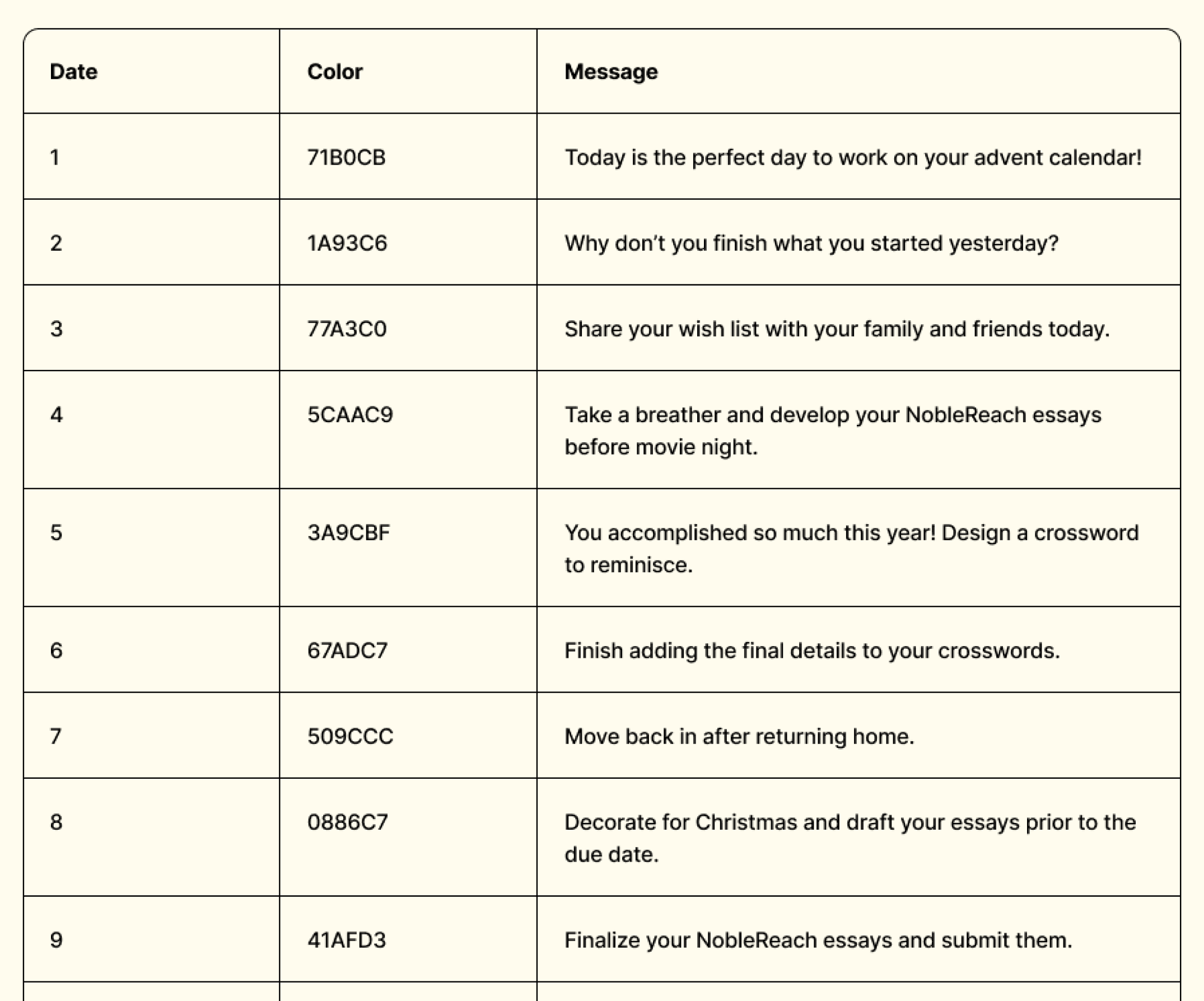
During the design process, this table tracked data for each element to simplify implementation.
Interaction Design
The experience relies on small interactions that communicate progress while maintaining simplicity.
Each tile moves through three interaction states:
Locked – Before its assigned date, the tile appears faded and cannot be clicked. Hovering or tapping reveals the unlock date.
Unlocked – When the date arrives, the tile becomes interactive and returns to full color.
Opened – Clicking an unlocked tile reveals the day’s message or activity.
These transitions create a rhythm of anticipation, discovery, and reward.
Design Constraints
The project was shaped by several practical constraints that influenced layout and interaction decisions.
Mobile-First Design
The interface was primarily designed for iPhone 13, my personal device, which was used for prototyping and testing. However, responsive layout principles ensure the calendar works across devices and screen sizes.
Grid Structure
The calendar required displaying 24 days in a clear and consistent format. A two-column grid provided the best balance between readability and structure.
Time-Based Logic
Each tile needed to support multiple states—locked, unlocked, and opened—while automatically updating based on the current date.
Content Format
Because each day contains a short message or activity, the interface needed to prioritize readability and concise interactions.
Information Architecture
The site uses a simple single-page structure centered around the calendar grid.
Key elements include:
A landing section introducing the countdown
A vertically scrolling grid of 24 tiles
Individual interactions for each tile
Minimal supporting UI
This structure allows users to understand the experience immediately without instructions.
UI Design
The interface uses a soft, minimal visual style to create a cozy holiday atmosphere.
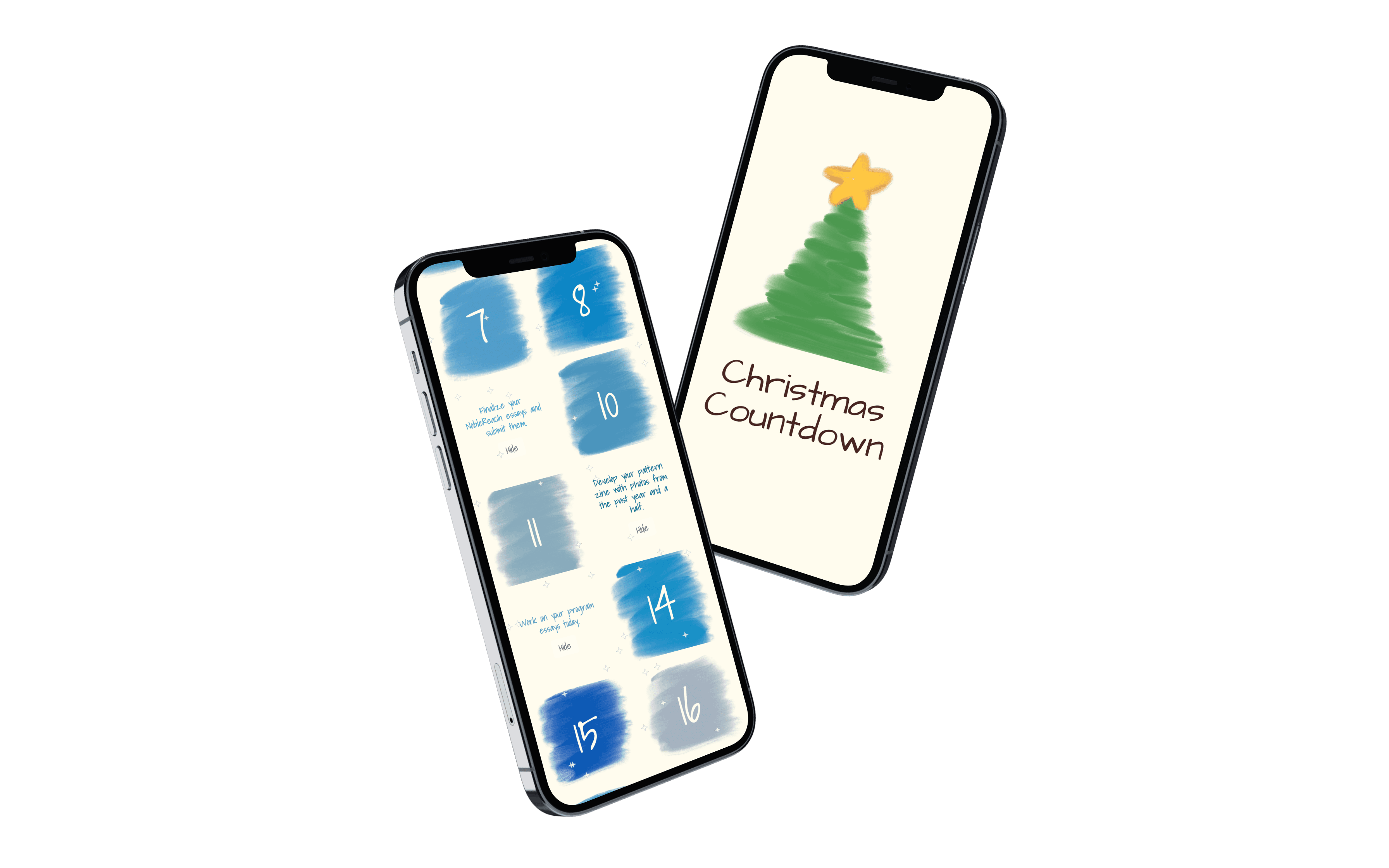
A cream-colored background provides contrast for the calendar tiles, which are displayed on textured blue brush strokes. This painterly style adds personality while keeping the layout simple.
The friendly typography, Architect's Daughter, and subtle star accents reinforce the seasonal tone without overwhelming the interface.
The Final Design
The final mobile-first advent calendar interface, featuring a 2×12 grid of interactive tiles that unlock sequentially from December 1 through December 24.
Impact and Reflection
This project demonstrates how thoughtful UX design can transform a simple idea into a meaningful interactive experience.
By focusing on anticipation, clarity, and emotional design, the calendar recreates the joy of opening a daily advent door in a digital format.
It also reinforced the value of designing within constraints—balancing layout structure, time-based interactions, and mobile usability to create a cohesive experience.
Outcomes:
The interface felt intuitive and easy to navigate
The daily unlocking mechanic created anticipation
The visual style conveyed a warm, festive tone
The concept of sharing the calendar resonated strongly with users
This project reinforced the value of simplicity in interaction design. Rather than adding complex features, the experience relies on a small number of clear interactions that support anticipation and discovery.
It also highlighted how thoughtful design can transform familiar traditions into digital experiences. By focusing on emotional engagement and accessibility, the calendar becomes more than a countdown; it becomes a small ritual that people can share during the holiday season.
“Recreating a familiar holiday tradition in a digital format showed me how small interactions can carry emotional meaning, especially when they help people stay connected across distance.”
Credits
Inspired by the playful digital advent calendars created by littlecalendars.com, designed by @meshtimes on Instagram, whose work demonstrates how small interactive experiences can feel handcrafted and delightful.
